> ## Documentation Index
> Fetch the complete documentation index at: https://help.retainful.com/llms.txt
> Use this file to discover all available pages before exploring further.
# Connect WordPress
> Install the Retainful plugin on your WordPress site and connect it with a token — for WordPress sites without WooCommerce.
This guide is for **WordPress sites without WooCommerce**. If WooCommerce is installed and active on your site, follow [Connect WooCommerce](/integrations/woocommerce) instead.
Use the Retainful plugin to connect a regular WordPress site — a blog, business site, or landing page — to Retainful. Once connected, you can show Retainful signup forms and popups on your site, grow your list, and email your subscribers with campaigns and automations.
## Requirements
* WordPress **6.5** or later.
* PHP **7.4** or later.
* The **Retainful** plugin installed and activated.
* An administrator account on your WordPress site.
* Your site must be publicly reachable on the internet (local sites like `localhost` can't connect).
## What works on a WordPress site
| Feature | WordPress | WooCommerce |
| -------------------------------------------------------- | --------- | ----------- |
| [Signup forms and popups](/forms/overview) | Yes | Yes |
| [Campaigns](/campaigns/overview) to your contacts | Yes | Yes |
| [Automations](/automations/overview) like welcome series | Yes | Yes |
| WPForms submissions to Retainful lists | Yes | Yes |
| Abandoned cart recovery | No | Yes |
| Order and product sync | No | Yes |
| Coupon step in automations | No | Yes |
| Checkout and order-based automation templates | No | Yes |
Cart, order, and product features need WooCommerce. If you add WooCommerce to your site later, connect it through [Connect WooCommerce](/integrations/woocommerce).
## Install and connect
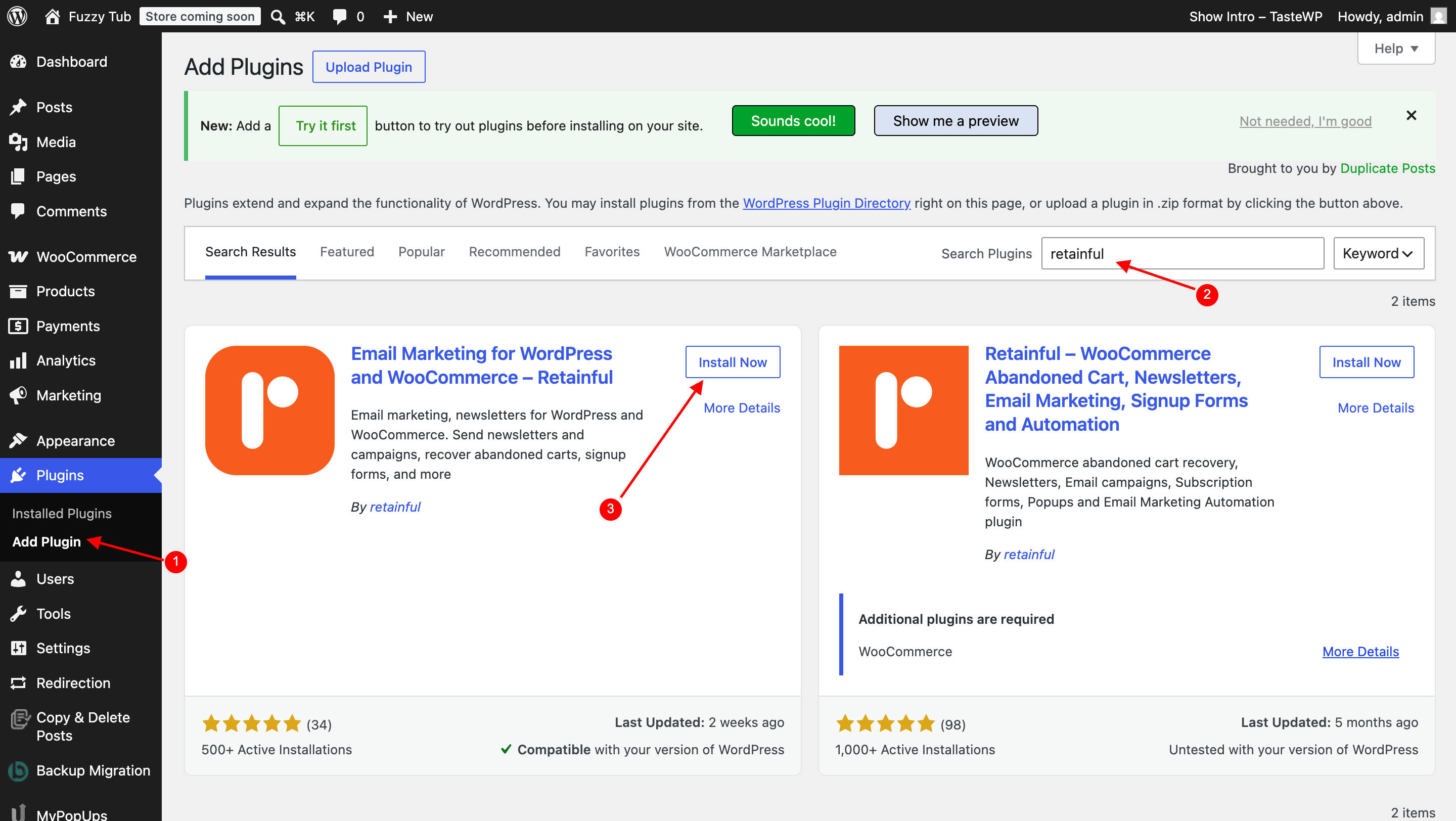
In your WordPress admin, go to **Plugins → Add New**, search for **Retainful**, then click **Install Now** and **Activate**.
 In Retainful, go to **Integrations** and open **WordPress**. Click **Copy** next to the **Token** field.
 The token expires shortly after it's shown. If connecting fails, come back to this page and copy a fresh token.
In your WordPress admin, click **Retainful** in the left menu. Under **Integrations**, find the **WordPress** card and click **View Settings**.
The token expires shortly after it's shown. If connecting fails, come back to this page and copy a fresh token.
In your WordPress admin, click **Retainful** in the left menu. Under **Integrations**, find the **WordPress** card and click **View Settings**.
 Paste the token into the **API Key** field and click **Connect**.
 The plugin shows **Connected — Your site is connected to Retainful.** In Retainful, **Integrations → WordPress** shows your site under **Connected Site** with a **Connected** badge.
 You don't need to enter your site URL in Retainful — the plugin sends it automatically when you connect.
## Show signup forms on your site
Once your site is connected, forms and popups you publish in Retainful appear on your site automatically — no code or theme editing needed. See [Create a form](/forms/create-a-form) to build your first one.
If you use a caching plugin (like WP Rocket or LiteSpeed Cache) and a new popup isn't showing, clear your site cache and check again.
## One platform per organization
A Retainful organization can connect only **one** platform — Shopify, WooCommerce, or WordPress. If your organization already uses another platform, the WordPress page shows **Platform Integration Conflict**. To connect a WordPress site, create a new organization and connect it there.
Each organization connects one WordPress site. Connecting a different site replaces the previous one.
## Troubleshooting
The token expires shortly after it's shown. Go back to **Integrations → WordPress** in Retainful, copy a fresh token, and click **Connect** in the plugin again right away.
Your server needs to reach Retainful over the internet. Check that your host or a security plugin isn't blocking outgoing requests, then try again with a fresh token.
Firewalls like Cloudflare **Bot Fight Mode**, Wordfence, or other security plugins can block Retainful's requests to your site's REST API (`/wp-json/`). Temporarily disable the rule (or add an exception) while connecting, then re-enable it.
The **WordPress** card only appears when WooCommerce is **not** active. If WooCommerce is active, you'll see a **WooCommerce** card instead — follow [Connect WooCommerce](/integrations/woocommerce).
Confirm the plugin shows **Connected**, the form is published in Retainful, and your site cache is cleared. Also check the form's [display rules](/forms/display-rules).
Retainful can only connect to a site that's publicly reachable. Use a live or publicly accessible staging URL.
## Disconnecting
To disconnect your WordPress site from Retainful, email [support@retainful.com](mailto:support@retainful.com) with your organization name and site URL. Your existing contacts and data stay in Retainful.
You don't need to enter your site URL in Retainful — the plugin sends it automatically when you connect.
## Show signup forms on your site
Once your site is connected, forms and popups you publish in Retainful appear on your site automatically — no code or theme editing needed. See [Create a form](/forms/create-a-form) to build your first one.
If you use a caching plugin (like WP Rocket or LiteSpeed Cache) and a new popup isn't showing, clear your site cache and check again.
## One platform per organization
A Retainful organization can connect only **one** platform — Shopify, WooCommerce, or WordPress. If your organization already uses another platform, the WordPress page shows **Platform Integration Conflict**. To connect a WordPress site, create a new organization and connect it there.
Each organization connects one WordPress site. Connecting a different site replaces the previous one.
## Troubleshooting
The token expires shortly after it's shown. Go back to **Integrations → WordPress** in Retainful, copy a fresh token, and click **Connect** in the plugin again right away.
Your server needs to reach Retainful over the internet. Check that your host or a security plugin isn't blocking outgoing requests, then try again with a fresh token.
Firewalls like Cloudflare **Bot Fight Mode**, Wordfence, or other security plugins can block Retainful's requests to your site's REST API (`/wp-json/`). Temporarily disable the rule (or add an exception) while connecting, then re-enable it.
The **WordPress** card only appears when WooCommerce is **not** active. If WooCommerce is active, you'll see a **WooCommerce** card instead — follow [Connect WooCommerce](/integrations/woocommerce).
Confirm the plugin shows **Connected**, the form is published in Retainful, and your site cache is cleared. Also check the form's [display rules](/forms/display-rules).
Retainful can only connect to a site that's publicly reachable. Use a live or publicly accessible staging URL.
## Disconnecting
To disconnect your WordPress site from Retainful, email [support@retainful.com](mailto:support@retainful.com) with your organization name and site URL. Your existing contacts and data stay in Retainful.